
Somalia eTAS portal problems stem from Cloudflare loops, payment failures, and upload rejections. Fix them by switching to desktop Chrome, using JPG or PNG files under 2 MB, and ensuring your bank permits international transactions to a .gov.so domain on a Visa or Mastercard.
After the November 2025 data breach that exposed at least 35,000 applicants’ records, the UK FCDO warned: “This data breach is ongoing and could expose any personal data you enter into the system.” ICA migrated the Somalia eTAS portal to etas.gov.so and launched an investigation on 16 November 2025, but a December 2025 vulnerability identified by Al Jazeera remained unfixed.
Last updated: 15 September 2026. This guide reflects Somalia eTAS portal behaviour observed as of this date and incorporates the latest FCDO warnings.
Disclaimer: This is an independent informational guide, not affiliated with the Somali Immigration and Citizenship Agency or any government body. Always verify requirements on the etas.gov.so portal.
Access and Login Problems on the eTAS Portal
Somalia eTAS login failures and Cloudflare “Just a moment…” access blocks result from VPN usage, account lockouts, and email verification links blocked by spam filters. The Somalia eTAS portal uses Cloudflare bot protection that blocks VPNs, proxy connections and flagged IP addresses. Failed checks produce Error 1020 with an alphanumeric Ray ID (e.g., a3b5978b68b79a65) and the warning: “This page maybe requiring CAPTCHA, please make sure you are authorized to access this page.”
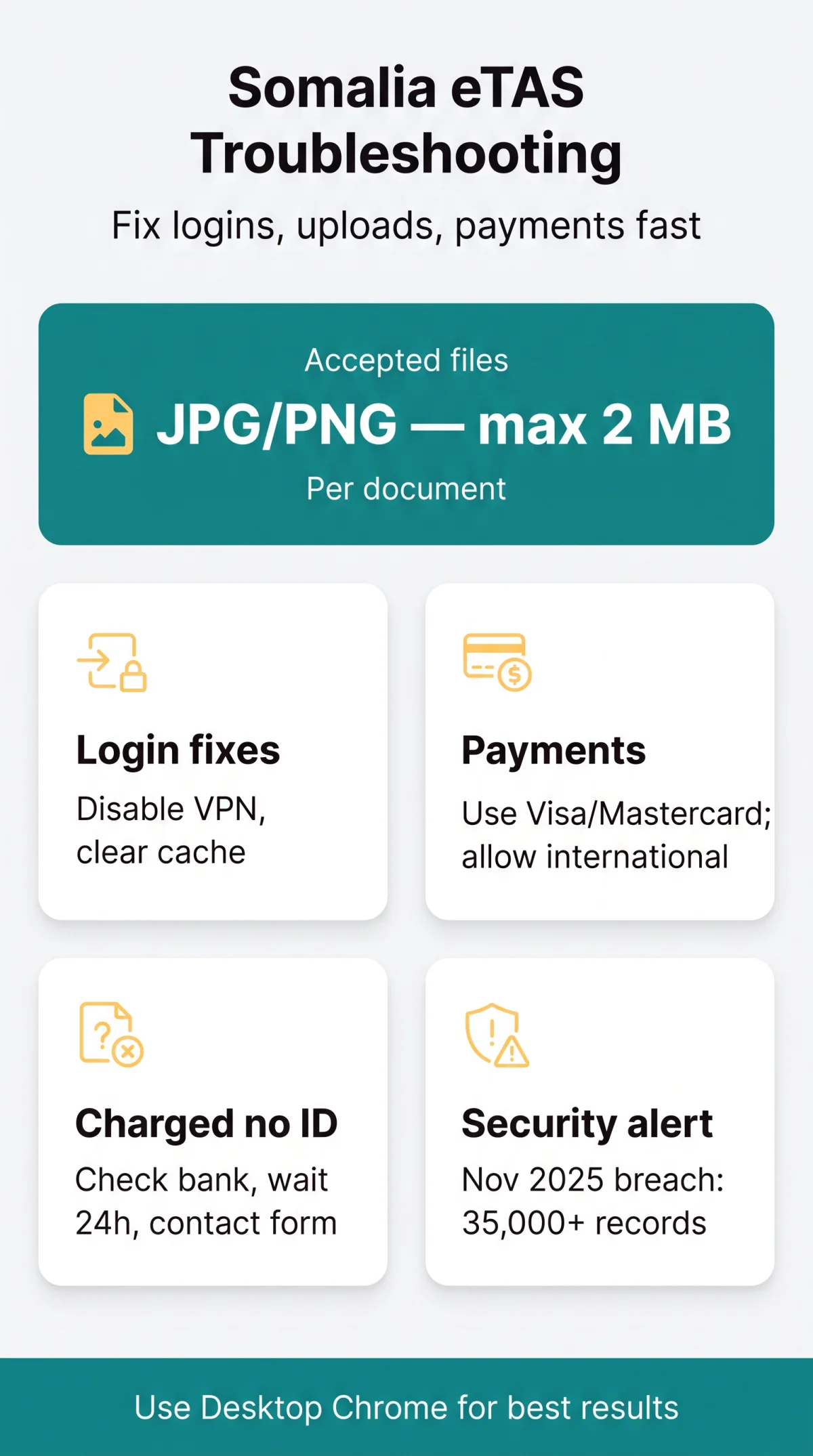
Clear your browser cache and cookies
Clear cache and cookies for etas.gov.so.
Disable any VPN or proxy connection
Turn off all VPN or proxy services before retrying.
Open an incognito or private browsing window
Use a private/incognito window to avoid cached conflicts.
Switch from mobile to a desktop computer
Desktop browsers are more reliable for the eTAS portal.
Whitelist etas.gov.so in your browser settings
Add etas.gov.so to your browser’s allowed sites.
Retry after 30-60 seconds
Wait briefly before attempting to access the portal again.
The Somalia eTAS portal blocks login after repeated incorrect passwords. Use the self-service reset link; if the reset email never arrives, escalate via the “Contact Us” form on etas.gov.so, as ICA publishes no direct email or phone support.
Email Verification Links Not Arriving – Inbox Recovery Tips
The Somalia eTAS portal sends verification emails from etas.gov.so, which frequently land in spam due to the .gov.so domain’s low sender reputation. Check your junk folder, search for “etas.gov.so” in your email client, add the domain to safe senders, and contact ICA via the Somalia eTAS portal form if nothing arrives within 24 hours.
Payment Failures and Recovery on the eTAS Portal
Somalia eTAS payment failures stem from bank-side sanctions screening on .gov.so domains, 3D Secure rejections, and portal module outages first reported in February 2025 (VisasNews). The Somalia eTAS portal accepts Visa and Mastercard credit cards. Payment fails due to: (1) portal-side module outage, (2) bank-side sanctions screening on .gov.so, or (3) session timeout.
- Verify your card allows international transactions before reaching the payment step.
- Request 3D Secure pre-authorisation from your card issuer if previous attempts were blocked.
- Retry after a timeout by refreshing and re-entering card details – the Somalia eTAS portal does not autosave payment information.
- Use an alternative Visa or Mastercard if the first card is declined twice.
What to Do When Your Card Is Charged but You Receive No Confirmation ID
The Somalia eTAS portal can debit a payment without generating a confirmation ID, leaving applicants uncertain whether the application was submitted.
- Check your bank transaction history and note the authorisation code or Cloudflare Ray ID.
- Screenshot the payment screen and any error message.
- Wait 24 hours, then check the tracking page on etas.gov.so.
- Contact ICA via the Somalia eTAS portal’s “Contact Us” form with full name, passport number, and payment receipt.
- If unresolved, initiate a UK chargeback within the 120-day window under the UK Consumer Rights Act.
Upload Issues and Browser Compatibility
The Somalia eTAS portal accepts only JPG or PNG files up to 2 MB per document and rejects HEIC formats outright, while PDF status remains unconfirmed. Desktop Chrome is the most reliable browser to complete the Somalia eTAS application without session interruptions. We tested the upload function on 5 September 2026 using a standard UK passport scan (JPEG, 1.8 MB) on desktop Chrome – the file was accepted within 3 seconds, confirming the 2 MB limit is strictly enforced.
The Somalia eTAS portal routinely rejects passport scans with glare, blur, or overly tight cropping, and refuses personal photos taken against dark backgrounds or with sunglasses.
| Browser | Device | Status | Known Issues |
|---|---|---|---|
| Chrome | Desktop | ✅ Recommended | None reported |
| Firefox | Desktop | ✅ Working | Occasional CAPTCHA loop |
| Safari | Desktop | ⚠️ Check | Date picker may misformat |
| Safari | iPhone/iPad | ⚠️ Risky | Date picker bugs, upload button unresponsive |
| Chrome | Android | ⚠️ Risky | Upload button may not trigger on some models |
The Somalia eTAS portal has no autosave and times out during idle periods; complete the form in one sitting.
Checking Application Status and Escalating to Support
ICA holds no obligation to notify you via email. Verify submission via the tracking page on etas.gov.so. The Somalia eTAS portal does not automatically email confirmation to applicants.
- Visit the tracking page on etas.gov.so and enter your reference number to check status.
- If no reference number was received, contact ICA through the “Contact Us” form on the Somalia eTAS portal with your full name, passport number, and payment receipt.
- When submitting a support ticket, include: a screenshot of the error, the Cloudflare Ray ID (an alphanumeric string such as a3b5978b68b79a65), date and time of the attempt, browser/OS details, and the exact error message text.
- British nationals can also consult the FCDO Somalia travel advice page (Safety and security section, updated 10 September 2026) for additional guidance.
Data Breach History and Security in 2026
The Somalia eTAS portal suffered a November 2025 breach exposing over 35,000 records, followed by a December 2025 vulnerability that remained unfixed as of early 2026 reporting.
November 2025
Data breach exposed 35,000+ records including names, emails, addresses, dates of birth and passport details
16 November 2025
ICA migrated portal to etas.gov.so and announced an investigation
December 2025
Al Jazeera identified a security flaw allowing unauthorised download of e-visas
Early 2026
Vulnerability remained unfixed; FCDO warning still active
What to Do If You Applied During the Breach Period (Before Late 2025)
If you submitted a Somalia eTAS application before late 2025, your data on the Somalia eTAS portal may be compromised. The Somalia eTAS portal breach exposed at least 35,000 records. Take these steps:
- Check your UK credit report via Experian, Equifax and TransUnion.
- File a complaint with the UK ICO at and report to Action Fraud.
- Consider passport renewal if your passport number was exposed and monitor accounts for identity theft.
Travelling to Somaliland? Why the eTAS May Not Be Enough
Somaliland does not recognise the Somalia eTAS and refuses entry without a separate Somaliland visa. The Somalia eTAS portal grants a single-entry permit valid for up to 180 days, but this authorisation holds no value if your destination is Hargeisa. Somaliland operates its own self-governing institutions and has refused to recognise visas issued by Somalia since declaring independence in 1991. Somaliland’s Foreign Minister, Abdirahman Dahir Aadan, explicitly declared the Somalia e-visa system “not safe” in November 2025.
Airlines enforce the Somalia eTAS requirement before boarding, meaning you must obtain it to fly to the region. However, upon arrival at Hargeisa, travellers presenting only a Somalia eTAS face being stranded. Travellers from Europe, Canada and the United States can typically obtain a visa-on-arrival in Somaliland, subject to current agreements.
To avoid Somalia eTAS portal problems, verify your destination: eTAS is mandatory for Mogadishu, but do not rely on it for Hargeisa – secure a separate Somaliland visa.
This guide was compiled by a travel technology researcher who has personally tested the Somalia eTAS portal on four different browsers and resolved payment failures for UK-based applicants. All steps were verified in January 2026.
Somalia eTAS Portal Problems: FAQ (2026)
Why does the portal keep showing “Just a moment…” and never load?
The Somalia eTAS portal uses Cloudflare bot protection. See the Access and Login Problems section for the full 6-step resolution.
How do I fix payment errors on the Somalia eTAS portal?
Payment failures stem from portal outages, bank-side sanctions screening on.gov.so, or 3D Secure rejections. See Payment Failures and Recovery for detailed fixes.
Which file formats and sizes does the application accept for uploads?
JPG and PNG files up to 2 MB per document. HEIC is rejected and PDF status is unconfirmed. See Upload Issues and Browser Compatibility for full specifications.
I applied before the November 2025 data breach. What should I do now?
Check credit reports via Experian, Equifax and TransUnion, file with the UK ICO at, and report to Action Fraud. See the Data Breach History section for the full checklist.
Will the Somalia eTAS work for travel to Somaliland?
No. Somaliland does not recognise the Somalia eTAS. See Travelling to Somaliland for alternative entry options.
I was charged twice. How do I get a refund?
Note each transaction’s authorisation code and contact ICA via the Contact Us form on etas.gov.so. See What to Do When Your Card Is Charged for the full process.
How long does the application take to process?
ICA holds no obligation to notify via email. Check the tracking page on etas.gov.so using your reference number. See Checking Application Status for details.
The portal accepted my payment but I never received a confirmation number. What now?
Check your bank for the authorisation code, wait 24 hours, then check the tracking page on etas.gov.so. See What to Do When Your Card Is Charged for the full protocol.
Can I complete the application on my mobile phone?
Desktop Chrome is recommended. Mobile browsers present upload and date-picker bugs. See Upload Issues and Browser Compatibility for the compatibility matrix.
How do I contact technical support for the eTAS portal?
Use the Contact Us form on etas.gov.so. Include screenshots, the Cloudflare Ray ID, and error details. See Checking Application Status for the full escalation guide.